Schedule YouTube Shorts without opening YouTube Studio
Upload your video, write your description, and let Posthive post it at the right moment. No more rushing to hit publish during peak hours.
Native, not glued on.
Every YouTube feature Posthive supports is implemented against the native YouTube API — not workarounds, not browser automation.
- YouTube Shorts
- Regular video uploads
- Title up to 100 chars
- Description up to 5,000 chars
- Automatic #Shorts tagging
- Google OAuth 2.0
Schedule YouTube from one composer.
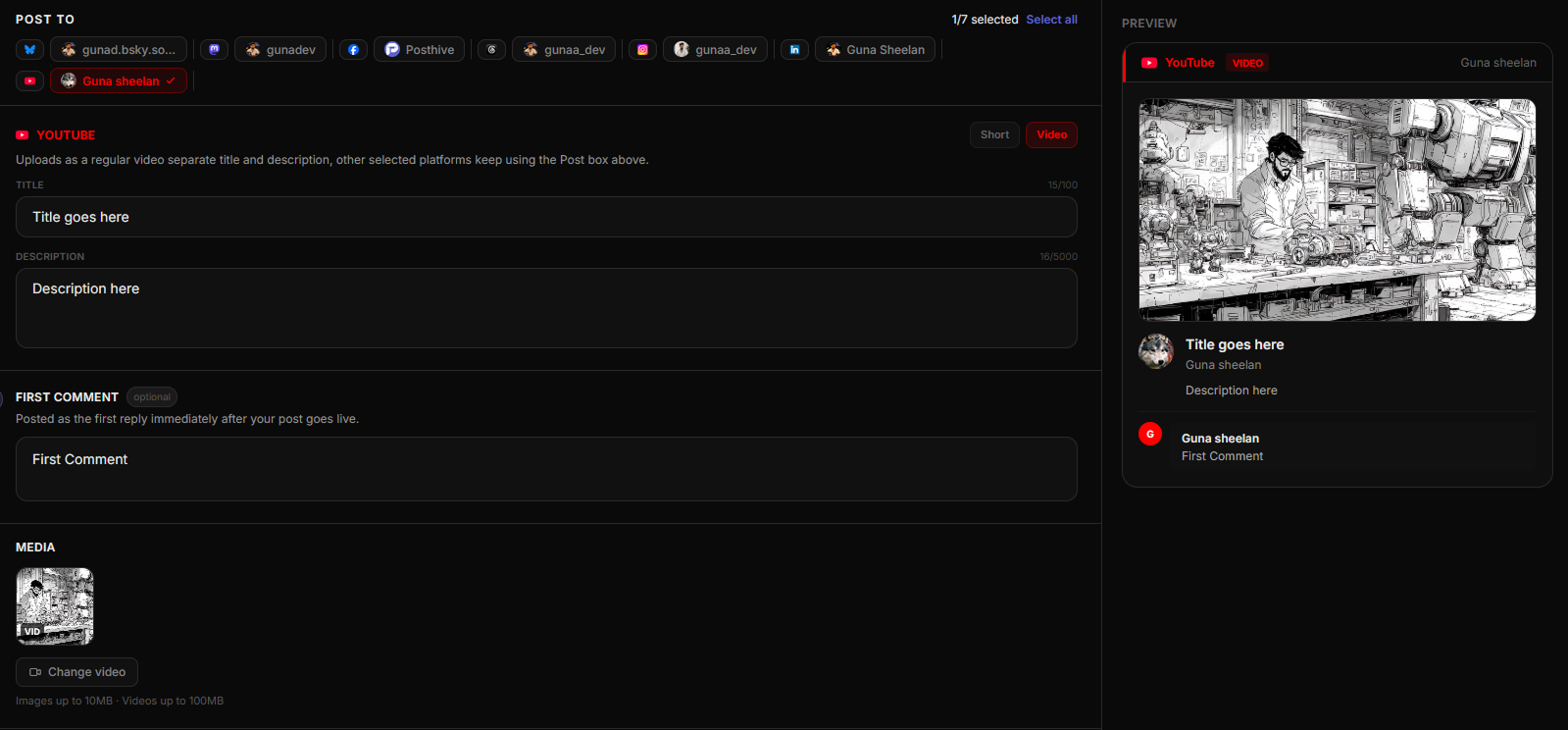
Fig. 01 — Posthive composer showing YouTube post preview
Connect once. Schedule forever.
Connect your YouTube channel
Authorize Posthive via Google OAuth. Your channel is linked securely in seconds.
Upload your video and fill in details
Attach your video file, write the title and description in the dedicated YouTube fields, and toggle Short vs. Video.
Schedule the upload
Posthive uses YouTube's resumable upload API to push your video and publish it at the exact scheduled time.
Built for YouTube from day one.
Schedule Shorts at peak hours without staying up late
YouTube Shorts get the most traction when published during peak viewing windows — typically evenings and weekends. Posthive lets you upload your video and set an exact publish time so you hit those windows every time without being at your desk.
Dedicated title and description fields
YouTube is different from every other platform — it needs a title, a description, and a video file. Posthive has dedicated fields for all three, separate from your main post content, so nothing gets mixed up between platforms.
Resumable upload API — no dropped uploads
Posthive uses YouTube's resumable upload API to push video files. If the connection hiccups mid-upload, it resumes from where it left off. Large video files don't fail silently.
Frequently asked questions
Can I schedule YouTube Shorts with Posthive?+
Yes. Posthive supports YouTube Shorts scheduling. Toggle the Short option in the composer and Posthive automatically adds the #Shorts tag and sets the correct video parameters for the Shorts feed.
What video formats does Posthive support for YouTube?+
Posthive uploads video files to YouTube using the resumable upload API. Standard formats like MP4, MOV, and AVI are supported. YouTube processes the video after upload, which may take a few minutes.
How do I connect my YouTube channel?+
Click Connect YouTube in the Accounts page. You're redirected to Google's OAuth page where you approve access to your YouTube channel. The token is stored encrypted and refreshed automatically.
Can I schedule regular YouTube videos (not just Shorts)?+
Yes. Posthive supports both YouTube Shorts and regular video uploads. Toggle between Short and Video in the composer. Regular videos include a full title and description field.
YouTube is one of thirteen platforms.
Posthive also posts to Bluesky, Threads, Instagram, LinkedIn, Mastodon, Pixelfed, YouTube, Facebook Pages, Pinterest, Telegram, Nostr, Discord, and Tumblr — all from the same composer.
 Instagram
 Nostr
NostrStart scheduling for free.
14-day free trial. No credit card required. Connect your YouTube account in under a minute and schedule your first post today.