Different platform, different message.
LinkedIn and Bluesky have different audiences, different character limits, and different norms. Per-platform overrides let you tailor your message for each network without creating separate posts.
The grind of cross-posting, gone.
One audience isn't like another
What performs on LinkedIn reads as corporate on Bluesky. What works on Threads is too casual for LinkedIn. Overrides let you adapt without duplicating your effort.
Character limits vary by platform
Bluesky caps you at 300 characters. LinkedIn gives you 3,000. Write the short version for one and expand it for the other in the same composer.
Consistent theme, different voice
Keep the same core message but adjust the tone, the hashtags, the CTA, or the media per account. Posthive tracks it all in one scheduled post.
The feature, in the app.
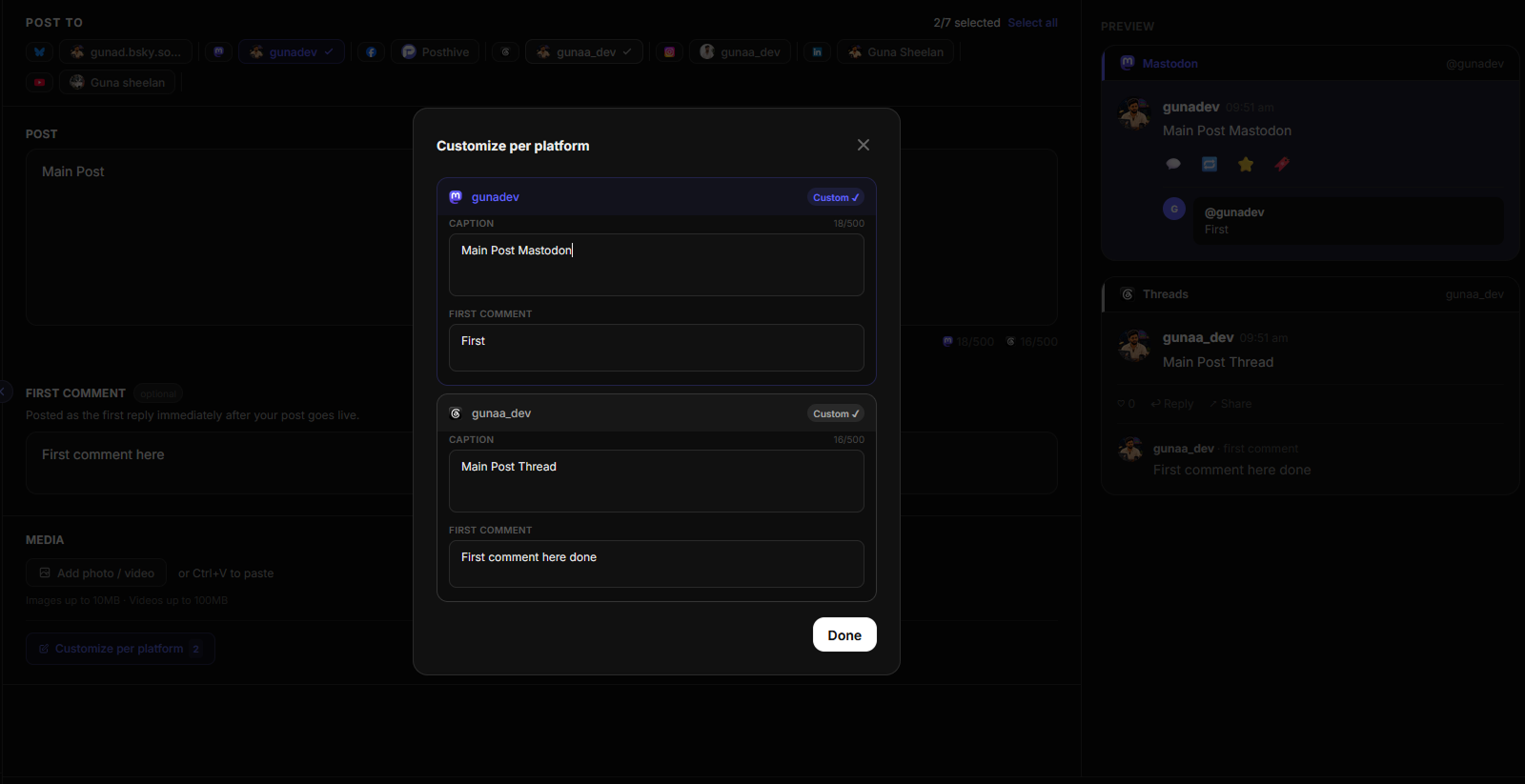
Fig. 01 — Posthive per-platform customize dialog
Three steps.
No manuals.
- 01
Write your base post
Compose your post as normal. This becomes the default for all selected platforms.
- 02
Click Customize for an account
Expand the per-platform section and click Customize on any account to open its override editor.
- 03
Tailor and schedule
Edit the text (and first comment) independently for that account. Posthive uses the override for that platform, the base post for the rest.
Built for people shipping in public.
- ◆Posting a professional update on LinkedIn and a casual take on Threads
- ◆Fitting a long post into Bluesky's 300-char limit with a summarized version
- ◆Using different hashtags per platform
- ◆Varying the CTA depending on where the audience is
“I was copy-pasting the same post into five different apps every day. Every tool I tried was too expensive, too bloated, or didn't support the platforms I actually used. So I built Posthive.”

Frequently asked questions
What are per-platform overrides?+
Per-platform overrides let you write a custom version of your post for any specific account. The override replaces the base post for that platform only all other platforms use the base.
Can I override the first comment per platform too?+
Yes. The override editor also has a first comment field, so you can have platform-specific first comments alongside platform-specific post text.
What happens if I don't set an override for a platform?+
If no override is set, Posthive uses the base post text for that platform. Overrides are optional and only apply where you explicitly configure them.
Is per-platform overrides available on the free plan?+
Per-platform overrides are available on the Pro and Team plans.
Per-platform overrides is one of eight features working together.
Start scheduling for free.
14-day free trial. No credit card required. Connect your first account in under a minute and schedule your first post today.