Schedule Tumblr posts without staying logged in
Write your blog posts in Posthive, pick a publish time, and let Posthive push them to your Tumblr blog automatically text, images, and all.
Native, not glued on.
Every Tumblr feature Posthive supports is implemented against the native Tumblr API — not workarounds, not browser automation.
- Text posts up to 4,096 chars
- Images in NPF format
- Posts to your primary blog
- OAuth 1.0a secure connection
- Per-account text override
Schedule Tumblr from one composer.
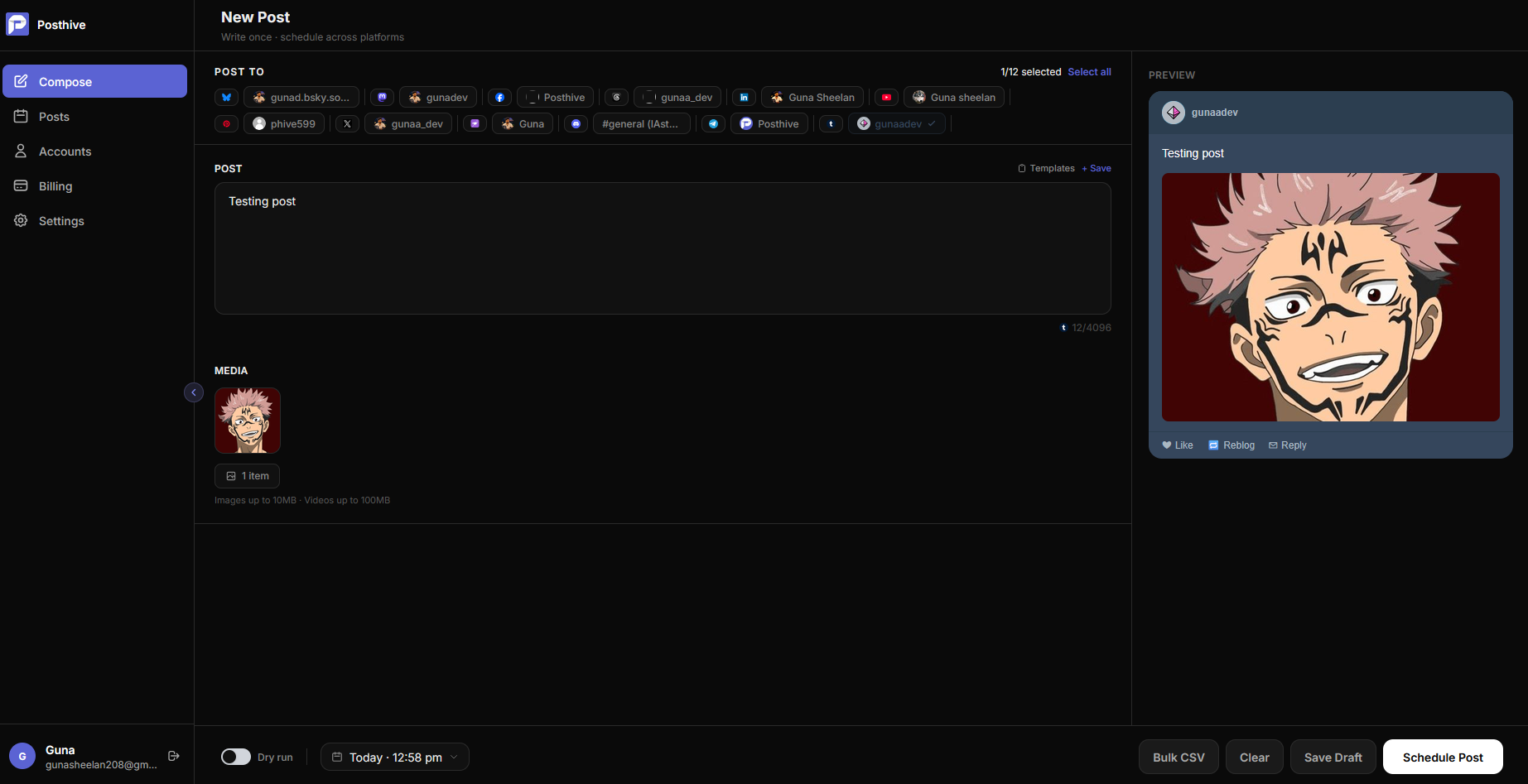
Fig. 01 — Posthive composer showing Tumblr post preview
Connect once. Schedule forever.
Register a Tumblr app
Go to tumblr.com/oauth/apps and register a new application. Set the callback URL to your Posthive API domain + /auth/tumblr/callback.
Add env vars
Add TUMBLR_CONSUMER_KEY, TUMBLR_CONSUMER_SECRET, and TUMBLR_REDIRECT_URI to your .env file.
Connect your blog
Click Connect Tumblr on the Accounts page. Approve the OAuth prompt and Posthive links to your primary Tumblr blog.
Built for Tumblr from day one.
A platform Postiz and most schedulers skip
Tumblr has a large, active creative community that most social schedulers ignore. Posthive is one of the only open-source schedulers that supports Tumblr — giving you access to an audience your competitors aren't reaching.
No expiring tokens, no re-auth needed
Tumblr's OAuth 1.0a access tokens never expire. Connect once and Posthive will keep posting without ever asking you to re-authenticate.
Text and images in every post
Posthive posts using Tumblr's NPF (Neue Post Format) — supporting rich text blocks and inline images. Your posts render beautifully in Tumblr's native UI.
Frequently asked questions
Does Posthive post to my primary blog or all blogs?+
Posthive posts to your primary Tumblr blog by default. You can connect additional blogs as separate accounts by going through the OAuth flow again.
Does Tumblr require API approval?+
No. Registering a Tumblr app at tumblr.com/oauth/apps is instant — no review process, no waitlist, no business verification. You get your consumer key immediately.
Can I schedule reblogs?+
Not currently. Posthive creates new original posts on your blog. Reblog scheduling is not supported by the Tumblr API for third-party apps.
What post format does Posthive use?+
Posthive uses Tumblr's NPF (Neue Post Format) for all posts. Text is posted as a text block, images are posted as image blocks — all in a single post, rendered natively in Tumblr.
Tumblr is one of thirteen platforms.
Posthive also posts to Bluesky, Threads, Instagram, LinkedIn, Mastodon, Pixelfed, YouTube, Facebook Pages, Pinterest, Telegram, Nostr, Discord, and Tumblr — all from the same composer.
 Instagram
 Nostr
NostrStart scheduling for free.
14-day free trial. No credit card required. Connect your Tumblr account in under a minute and schedule your first post today.