Schedule hundreds of posts from a spreadsheet.
Upload a CSV file and Posthive schedules every row automatically across multiple platforms with images, first comments, and per-row platform exclusions.
The grind of cross-posting, gone.
Batch your content creation
Write a week or month of content in a spreadsheet where you can see everything at once, then upload it in one shot. No switching tabs, no repeating the same clicks.
Granular platform control per row
Each row can target different platforms. Use !instagram to skip Instagram on a text-only post, or bluesky|mastodon for a specific audience. No separate posts needed.
Validate before you commit
The preview table shows every row with a ✓ Ready or ✕ error status before anything is scheduled. Catch bad dates, missing images, or unrecognized platform names instantly.
The feature, in the app.
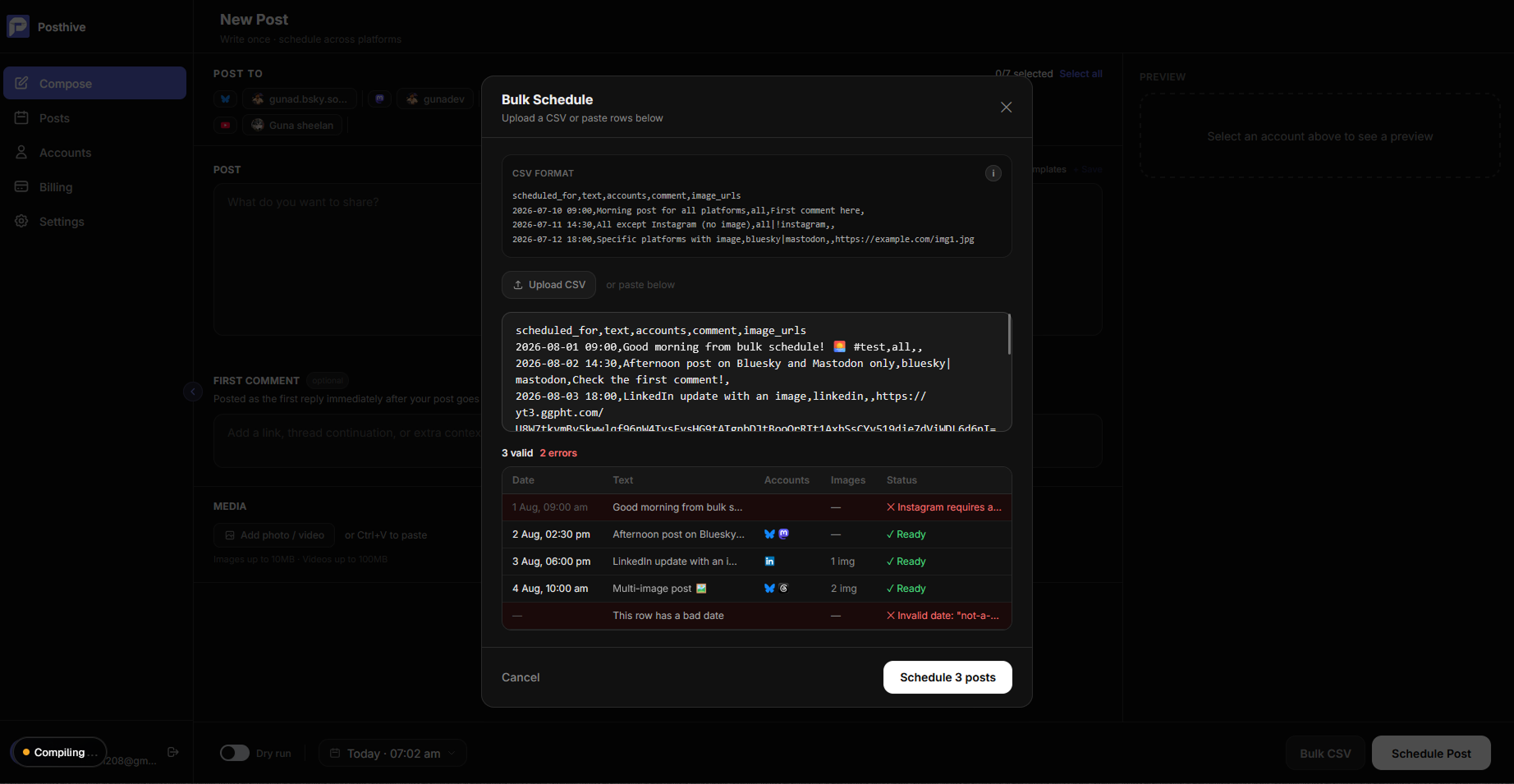
Fig. 01 — Posthive bulk CSV scheduling modal with preview table
Three steps.
No manuals.
- 01
Prepare your CSV
Create a spreadsheet with columns: scheduled_for, text, accounts, comment, image_urls. Save as CSV. Each row becomes one scheduled post.
- 02
Upload and preview
Open Bulk CSV from the Posts page or Compose page. Upload your file or paste the CSV. Click Preview to validate every row before scheduling.
- 03
Schedule all at once
Review the preview table, fix any errors, then click Schedule N posts. Posthive enqueues each valid row and shows a progress bar as they're submitted.
Built for people shipping in public.
- ◆Content managers scheduling a month of posts from a content calendar
- ◆Agencies onboarding a new client and front-loading their first month
- ◆Indie hackers scheduling a product launch drip across platforms
- ◆Creators batching content in one session to stay consistent all week
“I was copy-pasting the same post into five different apps every day. Every tool I tried was too expensive, too bloated, or didn't support the platforms I actually used. So I built Posthive.”

Frequently asked questions
What columns does the CSV need?+
The required columns are: scheduled_for (ISO datetime), text, and accounts. Optional columns are comment (first comment text) and image_urls (comma-separated URLs).
How do I target specific platforms per row?+
Set the accounts column to a pipe-separated list of platform names, e.g. bluesky|linkedin|threads. Use all to post to every connected account, or prefix with ! to exclude a platform.
Is there a row limit?+
There is no hard row limit in the app, but we recommend keeping batches under 500 rows for reliable preview performance. Larger batches can be split across multiple uploads.
Can I include images in the CSV?+
Yes. Add an image_urls column with one or more public image URLs per row (comma-separated). Posthive fetches and attaches them at publish time.
Bulk CSV scheduling is one of eight features working together.
Start scheduling for free.
14-day free trial. No credit card required. Connect your first account in under a minute and schedule your first post today.